Last Updated on March 18, 2026 by Simple Tech Help
While the internet has a lot to offer, users must check if a website is safe before they visit it, especially for the first time.
The internet contains millions of legitimate websites, but it also includes fraudulent sites designed to steal personal information or spread malicious software.
Before entering sensitive information such as passwords, payment details, or personal data, it is important to verify that a website is trustworthy.
Even if you do not enter information into an unsafe website, browsing on one long enough can cause pop-ups to open that start downloading malware or capturing your device’s information.
Fortunately, there are several simple checks you can use to determine whether a website appears safe or suspicious.
How to Quickly Tell If a Website Is Safe
If you are asking, “Is this website safe?” you already have some reason to doubt its validity.
To confirm or deny your suspicions, start with a few quick checks before interacting with the site.
Look for these signs:
- the website address begins with https://
- the domain name matches the company or organization you expect
- there are no unusual spelling mistakes in the URL
- the site does not pressure you with urgent warnings or prize offers
- the page looks professional and functions normally
If any of these checks raise concerns, avoid entering personal information and leave the website. The more time you spend on it, the more you allow for something to go wrong.
Taking a few seconds to verify a site can help you avoid phishing scams, malicious downloads, and identity theft.
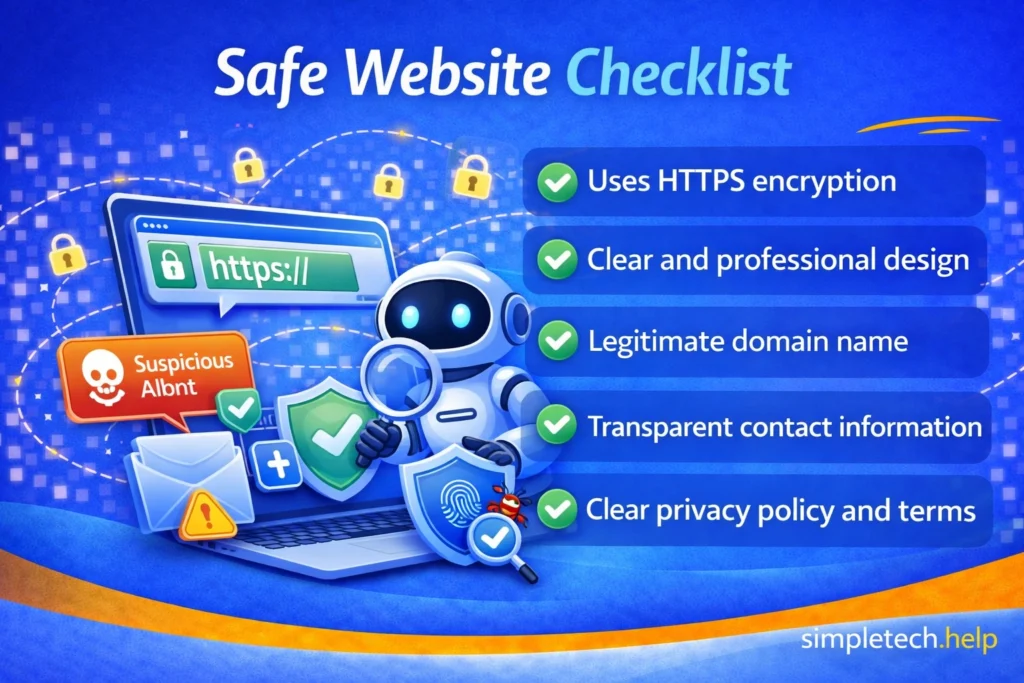
Website Is Safe Checklist
Let’s take a closer look at how you can check whether or not a website is safe.
Check the Website Address Carefully
One of the easiest ways to identify a suspicious website is to look closely at the URL (Uniform Resource Locator), the website’s address.
Scammers often create addresses that look similar to legitimate websites but contain small differences.
They may include:
- misspelled words
- extra characters
- unusual domain names
For example, a fraudulent website might replace letters with numbers or add additional words to imitate a well-known brand. At first glance, you may not think twice. But, under more careful inspection, you’ll save yourself a lot of grief.
If the website address looks unusual or slightly different from what you expected, it may be unsafe, and you should avoid spending more time on it.
Beginner Mistake: Trusting a website simply because it appears professional.
How to fix it: Always verify the website address and check for warning signs before entering personal information.
Look for HTTPS in the Address Bar
Most legitimate websites use HTTPS (Hypertext Transfer Protocol Secure), which means the connection between your browser and the website is encrypted.
You can usually see this by checking the beginning of the website address.
Safe websites start with https:// because it keeps their online assets and users safe.
Many browsers also display a small padlock icon in the address bar.
HTTPS does not guarantee a website’s trustworthiness, but its absence may indicate the site is not secure.
Some browsers, such as Chrome, will not allow you to visit a site that does not have HTTPS. The browser displays an error message and blocks your access.
Watch for Urgent or Suspicious Messages
Fraudulent websites often pressure visitors to take immediate action. Therefore, before taking any action suggested by these messages, remember why you landed on the website.
If the site requests your Social Security number or banking credentials without a legitimate reason, it is probably not safe to visit.
Common warning signs include messages that say:
- your account will be suspended
- you must verify information immediately
- your device is infected with viruses
- you have won a prize
These messages aim to create panic, so users act quickly without verifying the site.
Legitimate websites rarely pressure users with urgent threats or unexpected prizes.
Check the Overall Design and Content
Many scam websites have noticeable quality issues. The design looks outdated, and the text may not line up well.
Additionally, the site may contain:
- poor grammar or spelling mistakes
- low-quality images
- broken links
- unusual page layouts
Organizations build legitimate websites that help their customers find them. They use solid site architecture and pay professionals to proofread the content.
While design alone cannot prove whether a website is legitimate, obvious errors may indicate the site was created quickly or copied from another source. Therefore, avoid visiting it.
Verify the Organization Behind the Website
If a website claims to represent a company or organization, try confirming that the site is legitimate.
You can do this by:
- searching for the organization online
- visiting the company’s official website directly
- checking contact information or support pages
If the website cannot be easily verified or seems unrelated to the organization it claims to represent, it may not be trustworthy.
Myth: If a website appears at the top of search results, it must be safe.
Reality: Search results can include advertisements or malicious websites. It is still important to verify the site before trusting it.
Be Careful Before Entering Personal Information
Even if a website looks legitimate, avoid entering sensitive information unless you are confident the site is trustworthy.
Sometimes, you need to enter your information through an online portal. But you should avoid entering it without a valid purpose.
Examples of sensitive information include:
- passwords
- banking information
- credit card numbers
- Social Security numbers
If a website unexpectedly asks for personal information, it is wise to verify the site before continuing.
Use Security Tools in Your Browser
Modern web browsers include security features designed to help identify dangerous websites.
These tools may:
- warn you about known malicious websites
- block unsafe downloads
- display alerts for suspicious pages
While these tools cannot detect every threat, they provide an additional layer of protection when browsing the internet.
Be Careful with Links from Emails or Messages
Many fraudulent websites are accessed through links sent in emails, text messages, or social media posts.
These links may appear to come from legitimate organizations, but they actually lead to fake websites designed to steal login credentials or personal information.
Instead of clicking the suspicious link directly, it is often safer to navigate to the website manually by typing the official address into your browser.
Online safety requires users to actively practice good habits, such as ensuring that they have landed on a safe website.
Conclusion
Knowing how to evaluate whether a website is safe is an important part of protecting yourself online.
By checking the website address, looking for HTTPS, watching for suspicious messages, and verifying organizations before entering personal information, you can significantly reduce the risk of encountering fraudulent websites.
Taking a few moments to confirm that a site is legitimate can help prevent scams, identity theft, and other online security risks.
Next Step
Many unsafe websites are part of phishing attacks designed to trick people into revealing passwords or financial information.
To learn how these attacks work and how to avoid them, read Phishing Explained: How Online Scams Try to Steal Your Information.
Frequently Asked Questions
If you are unsure whether a website is safe, these common questions may help you identify potential risks.
Does HTTPS mean a website is safe?
HTTPS means the connection to the website is encrypted, but it does not guarantee that the site itself is trustworthy. Some fraudulent websites also use HTTPS.
What should I do if a website looks suspicious?
If a website appears suspicious, avoid entering personal information and leave the page. You can also search online to see if others have reported the site as unsafe.
Can legitimate websites ever be unsafe?
Occasionally, legitimate websites can be compromised by attackers. If something seems unusual or unexpected, it is best to proceed cautiously.