Last Updated on April 6, 2026 by Simple Tech Help
If you’re receiving too much spam email, you probably want to safely unsubscribe from it.
Unsubscribing from emails seems simple, but it’s not always safe.
While legitimate companies include an unsubscribe link, scammers also use fake unsubscribe links to:
- Track if your email is active
- Confirm you’re a real person
- Redirect you to phishing websites
In some cases, clicking “unsubscribe” can make things worse. You receive more spam emails, and some of them include phishing scams.
This guide will show you how to unsubscribe safely, and when not to click.
Why Unsubscribe Links Can Be Risky
Traditionally, clicking “unsubscribe” was the right move.
Today, that’s not always true.
Risks of clicking unsubscribe:
- Confirms your email is active
- Leads to fake websites
- Triggers more spam
- Installs malware (rare, but possible)
Not all unsubscribe links are trustworthy.
Mistake: Clicking “unsubscribe” on every unwanted email.
Why it’s a problem: Some unsubscribe links confirm your email is active, which can lead to you receiving phishing emails.
Fix: Only unsubscribe from trusted senders. Otherwise, mark as spam or block the sender.
Treat unsubscribe links like any other link and verify first.
When It’s Safe to Click “Unsubscribe”
It’s generally safe only if the email is from a trusted sender. Let’s explore various safe examples.
Retail Store Email
You receive emails from a store you signed up for.
Conclusion: Safe to unsubscribe.
You signed up for the retailer’s email, and you can ask them to stop emailing you. Every email the retailer sends to you has an unsubscribe link in the footer. Find it, click on it, and follow the prompts.
Newsletter You Recognize
A newsletter you previously subscribed to.
Conclusion: Safe to unsubscribe.
When you decide that you no longer want to receive the newsletter, look for the unsubscribe link in the footer. Newsletter providers are under the same mandates as retailers. They must let you unsubscribe when you request it.
Trusted Services
Several organizations, including service providers, communicate with their customers via email.
Emails from trusted service providers include:
- Banks
- Subscription services
- Known apps
Conclusion: You can safely unsubscribe by clicking on the link, as long as you’re confident the email is real.
Banks, subscription services, and known apps ask customers and users to sign up for email messages. It allows them to deliver promotions and updates to their inboxes. However, you can unsubscribe and opt to receive information through other means.
Rule: If you recognize the sender and expected the email, unsubscribing is usually safe.
When You Should NOT Click “Unsubscribe”
On the flip side, there are times when you should not click on the unsubscribe link.
Suspicious or Unknown Emails
In the modern digital era, users must practice caution when visiting websites, opening email attachments, and clicking on links.
If the email:
- Looks unfamiliar
- Contains strange wording
- Comes from an unknown sender
Conclusion: Do NOT click unsubscribe.
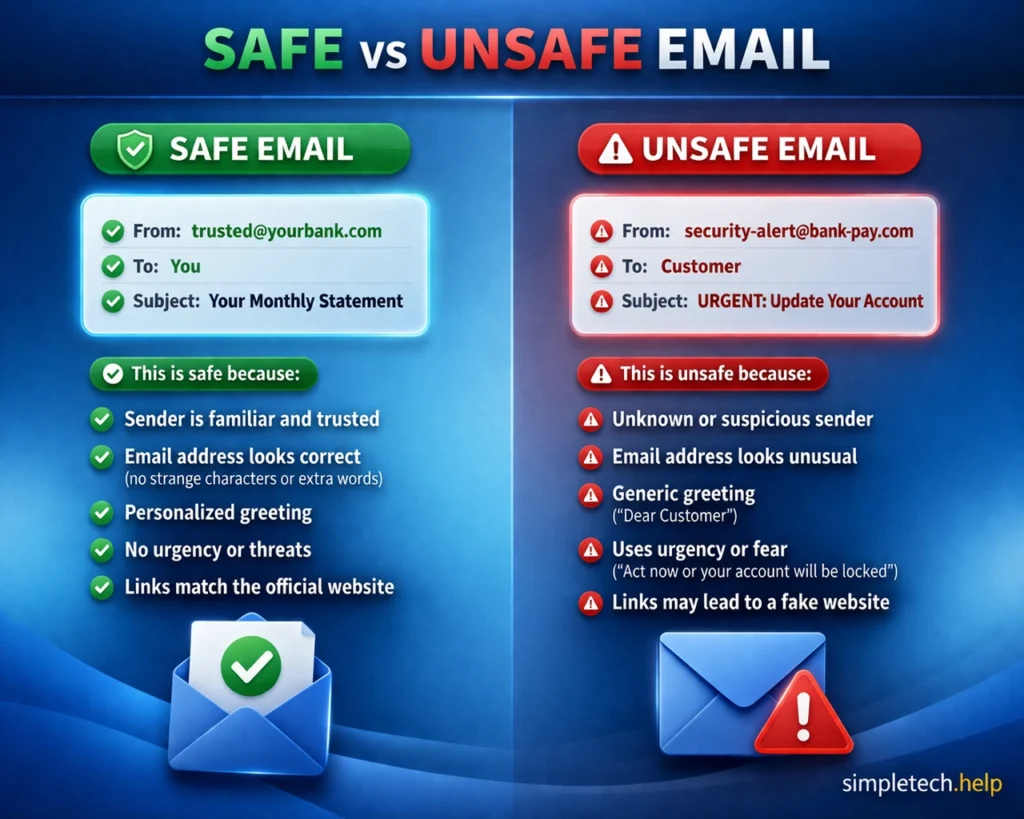
The email in this example displays common characteristics of a phishing scam.
Myth: “Clicking unsubscribe always stops emails safely.”
Reality: Some unsubscribe links are used for tracking or phishing scams.
Phishing Emails
Phishing emails have become prevalent. They are an easy way to target individuals who may panic into providing financial and personal information.
Phishing scams are fake emails pretending to be:
- Banks
- Delivery services
- Tech companies
They impersonate trusted sources to make you curious enough to open the email, open the attachment, call a specific phone number, or click a malicious link.
Conclusion: Do not click on the unsubscribe link because it may be malicious.
Spam Emails
Spam email refers to random promotions or irrelevant messages. You may not sign up for spam messages, but they may find their way to your inbox via third parties.
When a spam email is malicious, clicking unsubscribe may confirm your email is active. It could lead to receiving more messages and a greater chance of encountering a phishing attack.
Better option: Instead of clicking on the unsubscribe link, mark the email as spam or phishing. Your email provider’s filter will ensure it goes to your spam/junk folder instead of your inbox, keeping you safe.
The Safest Ways to Stop Emails
An email inbox needs management. Inbox management ensures that you don’t miss important messages, and it prevents you from missing strange behavior and messages that could compromise your accounts.
Here are ways to safely unsubscribe from unwanted emails.
Mark as Spam or Phishing
Marking unwanted emails as spam or phishing is often the safest way to unsubscribe.
What marking unwanted email as spam or phishing does:
- Filters similar emails automatically
- Prevents future messages
- Protects other users
Marking unwanted emails as spam or phishing trains your email provider’s filters. It will automatically filter emails and prevent future messages from reaching your inbox.
Additionally, it protects other users. The sender is most likely targeting others. Reporting the senders and messages alerts your email provider so they can take appropriate action.
Block the Sender
Instead of clicking on a suspicious link, block the sender. Blocking the sender stops all emails from that address.
Use Email Filters
Email filters help you organize your inbox. You set up rules, and the tool analyzes incoming messages and sorts them accordingly.
You can set rules to:
- Automatically delete
- Move emails to spam
The rules can prevent emails with suspicious links, potential malware, and phishing intent from reaching your inbox.
Unsubscribe Only When Safe
If you signed up to receive email alerts, notifications, or promotions from an organization that you trust, you can change your mind afterward.
Only click unsubscribe if:
- You trust the sender
- The email looks legitimate
- The link leads to a real website
Established organizations must protect their users and reputations. They must also adhere to the CAN-SPAM Act of 2003, which gives you, the email recipient, the right to ask organizations to stop emailing you.
Verify Before Clicking
One of the pillars of staying safe online is verifying before clicking on anything. Clicking a suspicious link can trigger a follow-up phishing attack that compromises your online accounts and devices.
If unsure about the link and its sender:
- Go directly to the company’s website
- Log into your account
- Manage email preferences there
Verifying links before clicking them helps you avoid risky links entirely. It provides peace of mind and prevents the grief that comes with worrying about how to deal with the aftermath of a successful phishing attack.
Unsubscribing Safely: Real-Life Examples
To illustrate how to unsubscribe safely from emails, here are some real-life examples.
Example 1: Safe Unsubscribe
You get emails from a clothing brand you signed up for. However, the retailer starts sending you daily emails, which clutter your inbox.
👉 You click unsubscribe and are taken to a clean, branded page.
Conclusion: ✔️ Safe
When you sign up for an email list or a newsletter of an established organization, you may change your mind later and decide to unsubscribe. After verifying the link, you can safely unsubscribe.
The unsubscribe link will take you to a landing page confirming your choice. Sometimes, it shows you several options, allowing you to unsubscribe from all email communications or some.
Example 2: Fake Unsubscribe Link
You receive an email saying: “Click here to unsubscribe from all future emails.”
👉 The sender is unfamiliar.
Conclusion: ❌ Unsafe. This could be a phishing or tracking attempt.
Because the sender is unfamiliar, the email and its request fall into the suspicious category. Instead, mark the email as phishing or spam.
Example 3: Delivery Scam
You receive an email that says: “Unsubscribe from delivery alerts.”
👉 You never signed up.
Conclusion: ❌ Do NOT click. Mark as spam.
When you receive an unfamiliar email that creates a sense of urgency, it may be a phishing scam. Even if you did sign up for delivery alerts from a specific retailer or delivery service, double-check the sender and your records. Do you want to unsubscribe from their delivery alerts?
If not, the email falls into the suspicious category.
Key Insight: Unsubscribe links are only safe when the sender is trusted.
Signs an Email or Unsubscribe Link Is Suspicious
Safely unsubscribing from specific emails means avoiding red flags. Here are the red flags to look for before clicking on any links.
- Unknown sender
- Misspelled email address
- Urgent or threatening language
- Poor formatting or grammar
- Generic greetings (“Dear user”)
- Links that don’t match the company
If you notice these signs, avoid clicking anything.
Quick Unsubscribe Safely Checklist
Follow this checklist to safely unsubscribe from unwanted emails and spam.
- ✅ Only unsubscribe from trusted senders
- ✅ Avoid clicking links in suspicious emails
- ✅ Mark spam instead of interacting
- ✅ Block repeat senders
- ✅ Verify before taking action
A few seconds of caution can prevent bigger issues.
Learning & Next Steps
Now that you understand how to unsubscribe safely, the next step is building awareness when dealing with any unexpected email.
Start simple:
- Don’t trust links automatically, even unsubscribe links
- Verify the sender before taking action
- Use spam and blocking tools when unsure
Email is one of the most common ways scammers reach people, but it’s also one of the easiest to control once you know what to look for.
Bookmark this guide so you can return anytime you’re unsure about an email.
As you continue learning, these guides can help:
Take Action if Something Feels Suspicious
- Is a website safe? How to tell.
- Email hacked? What to do.
Strengthen Your Overall Online Security
- Account Security Basics: The basics of online account security.
- Online Safety Basics: The basics of online safety.
Next time you see an unsubscribe link, pause and ask: Do I trust this sender? If not, mark it as spam instead of clicking.
Frequently Asked Questions
Email inbox management is a multi-step process. When you’re receiving too much spam, you must mark it as spam to train your email filter. It makes sense to want to unsubscribe from them to receive fewer emails, but you must do so safely. Otherwise, you’ll end up with more.
The following are frequently asked questions about unsubscribing safely, and answers.
Is It Safe to Click Unsubscribe in Emails?
Only if the email is from a trusted sender. Otherwise, it may be unsafe.
Why Do I Get More Spam After Unsubscribing?
Some scammers use unsubscribe clicks to confirm your email is active.
Should I Mark Emails as Spam Instead of Unsubscribing?
Yes, especially if the sender is unknown or suspicious.
Can Unsubscribe Links Be Phishing Scams?
Yes. Some lead to fake websites or track your activity.
What is the Safest Way to Stop Unwanted Emails?
Mark them as spam, block the sender, and avoid interacting with suspicious emails.